See the loadout, GUI & sky in 3D. No download needed.
Description
STEAMPUNK⚙️
Dive into a world of gears and steam with this uniquely designed pack.
The Steampunk Texture Pack features a completely new Minecraft GUI overlay, a redesigned start screen, and much more. Each element has been crafted to bring a captivating steampunk aesthetic to your game, enhancing your Minecraft experience with a touch of Victorian-era ingenuity.
Download the Steampunk Texture Pack now and transform your Minecraft gameplay with this fascinating new look.
New! with this pack:
- start screen - controls:
- settings screen - joysick and aim crosshair
- buttons - d-pad and tap
- gui - joystick and tap
- hotbar
___💬| COMMUNITY (っ^▿^)۶🍸🌟🍺٩(˘◡˘ )___
We invite you to join our Discord community where you can connect with fellow players, share your ideas, and report any bugs you encounter. Whether you have suggestions for improving the hotbar or need support with any issues, our community is here to help. Let’s build, explore, and create together!
DISCORD: https://discord.gg/g6vpenZ4x8
YOUTUBE: https://www.youtube.com/@znygames
Sign in to rate this packAdd your stars and help the best packs rise.
0
Rate Pack
Enjoying this pack? Leave a rating and help other players discover it. Every rating you give also earns profile XP toward amazing leveling rewards you can unlock along the way.Enjoying this pack? Rate it to help other players find it. Ratings also earn profile XP toward leveling rewards
(0 ratings)
How to use a Texture Pack:
After downloading your pack, follow these steps to get it working in your game:
Download the .mcpack file from PVPRP
Open the downloaded file and let it import into Minecraft
Go to Settings in Minecraft
Open Global Resources, or open a world and select Resource Packs
Find the pack and click Activate
Press Done and enjoy your new textures
If the file is a .zip, rename it to .mcpack before opening it.



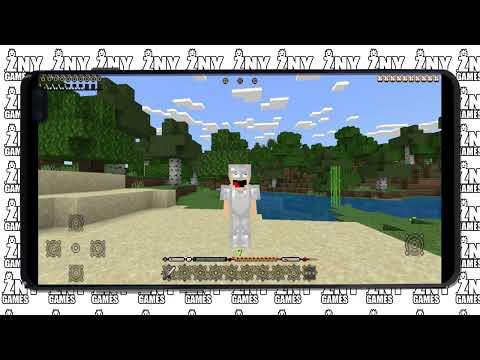 Pack Video
![Steampunk [BEDROCK] 16x Minecraft texture pack by znygames, screenshot 1](assets/packs/znygames/15267/gallery/armor.jpg.webp)
![Steampunk [BEDROCK] 16x Minecraft texture pack by znygames, screenshot 2](assets/packs/znygames/15267/gallery/crafting.png.webp)
![Steampunk [BEDROCK] 16x Minecraft texture pack by znygames, screenshot 3](assets/packs/znygames/15267/gallery/creative.png.webp)
![Steampunk [BEDROCK] 16x Minecraft texture pack by znygames, screenshot 4](assets/packs/znygames/15267/gallery/gui.jpg.webp)
![Steampunk [BEDROCK] 16x Minecraft texture pack by znygames, screenshot 5](assets/packs/znygames/15267/gallery/gui.png.webp)
![Steampunk [BEDROCK] 16x Minecraft texture pack by znygames, screenshot 6](assets/packs/znygames/15267/gallery/startscreen.jpg.webp)
![Steampunk [BEDROCK] 16x Minecraft texture pack by znygames, screenshot 7](assets/packs/znygames/15267/gallery/startscreen.png.webp)







 Bedrock Edition


![BOSS [BEDROCK] 16x by znygames & zny games on PvPRP](https://pvprp.com/thumb.php?src=assets/packs/znygames/15249/banner.png&w=400)


![ONE PIZZA [BEDROCK] 16x by znygames & zny games on PvPRP](https://pvprp.com/thumb.php?src=assets/packs/znygames/15141/banner.png&w=400)
![Fortnite Edition [BEDROCK] 16x by znygames on PvPRP](https://pvprp.com/thumb.php?src=assets/packs/znygames/14797/banner.png&w=400)
![DarkModeLite [BEDROCK] 16x by znygames & zny games on PvPRP](https://pvprp.com/thumb.php?src=assets/packs/znygames/15339/banner.png&w=400)
![FROZEN [GUI PACK] 16x by znygames on PvPRP](https://pvprp.com/thumb.php?src=assets/packs/znygames/12517/banner.png&w=400)
![Winter [BEDROCK] 16x by znygames on PvPRP](https://pvprp.com/thumb.php?src=assets/packs/znygames/14931/banner.png&w=400)


