

 PVPRP
PVPRP
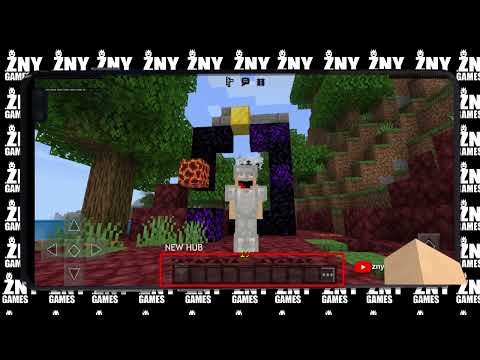 Pack Video
![Gallery Image 1 for DarkModeLite [BEDROCK] on PVPRP](assets/packs/znygames/15339/gallery/a_gui.jpg.webp)
![Gallery Image 2 for DarkModeLite [BEDROCK] on PVPRP](assets/packs/znygames/15339/gallery/bgbutton.png.webp)
![Gallery Image 3 for DarkModeLite [BEDROCK] on PVPRP](assets/packs/znygames/15339/gallery/brewingstand.png.webp)
![Gallery Image 4 for DarkModeLite [BEDROCK] on PVPRP](assets/packs/znygames/15339/gallery/creative.png.webp)
![Gallery Image 5 for DarkModeLite [BEDROCK] on PVPRP](assets/packs/znygames/15339/gallery/enchant.png.webp)
![Gallery Image 6 for DarkModeLite [BEDROCK] on PVPRP](assets/packs/znygames/15339/gallery/furnace.png.webp)
![Gallery Image 7 for DarkModeLite [BEDROCK] on PVPRP](assets/packs/znygames/15339/gallery/hub.png.webp)
![Gallery Image 8 for DarkModeLite [BEDROCK] on PVPRP](assets/packs/znygames/15339/gallery/inventory.png.webp)


After downloading your pack, follow these steps to get it working in your game:
If the file is a .zip, rename it to .mcpack before opening it.
Packs by game mode and style
Find your next look, download it in one click and wear it in game.

Every cape ever released, and how to get the ones still out.






 Bedrock Edition


![ONE PIZZA [BEDROCK] 16x by znygames & zny games on PvPRP](https://pvprp.com/thumb.php?src=assets/packs/znygames/15141/banner.png&w=400)


![Control Panel [BEDROCK] 16x by znygames on PvPRP](https://pvprp.com/thumb.php?src=assets/packs/znygames/14889/banner.png&w=400)
![Fortnite Edition [BEDROCK] 16x by znygames on PvPRP](https://pvprp.com/thumb.php?src=assets/packs/znygames/14797/banner.png&w=400)
![BOSS [BEDROCK] 16x by znygames & zny games on PvPRP](https://pvprp.com/thumb.php?src=assets/packs/znygames/15249/banner.png&w=400)
![Steampunk [BEDROCK] 16x by znygames & zny games on PvPRP](https://pvprp.com/thumb.php?src=assets/packs/znygames/15267/banner.png&w=400)
![FROZEN [GUI PACK] 16x by znygames on PvPRP](https://pvprp.com/thumb.php?src=assets/packs/znygames/12517/banner.png&w=400)


